
Zonal Shift is a free service from AWS, which allows users to disable an Availability Zone (AZ) for resources. In this post, we will walk through what it does and observe the results.
Zonal Shift currently supports ASG, EKS, ALB, and NLB. We can use it to simulate an AZ failure and ensure that your services continue to work in healthy AZs. In this example, I have 1 public-facing NLB and 2 EC2 instances running nginx web server. The 2 EC2 instances are spread across two different AZs. The terraform modules for creating all resources are available on https://git.headdesk.me/xpk/ZonalShiftLab.git
On my EC2 instances, I have a userdata script which installs nginx and places a simple index.html in the document root of nginx. The html file contains the AZ name where the EC2 instance resides. After deploying the resources, I sent 10 requests to the NLB. I can see that 4 requests were returned by the EC2 instance in AZ 1a, and 6 were returned by the EC2 instance in AZ 1c.
❯ for i in seq 1 10; do curl -s http://Lab-Demo-ZonalShift-nlb01-91c9850eac4303f2.elb.ap-northeast-1.amazonaws.com; done | sort | uniq -c
4 placement: ap-northeast-1a
6 placement: ap-northeast-1c
Load balancing is working as expected. Now let’s initiate a zonal shift and disable ap-northeast-1c (apne1-az1) with the following command:
❯ aws arc-zonal-shift start-zonal-shift \
--resource-identifier arn:aws:elasticloadbalancing:ap-northeast-1:040216112220:loadbalancer/net/Lab-Demo-ZonalShift-nlb01/91c9850eac4303f2 \
--away-from apne1-az1 \
--expires-in-minutes 30
Wait 1 minute or 2, then repeat the curl tests. Now I can see all requests are returned by the EC2 instance in AZ 1a
❯ for i in seq 1 10; do curl -s http://Lab-Demo-ZonalShift-nlb01-91c9850eac4303f2.elb.ap-northeast-1.amazonaws.com; done | sort | uniq -c
10 placement: ap-northeast-1a
On AWS console, I can see one of the AZs was marked as problematic
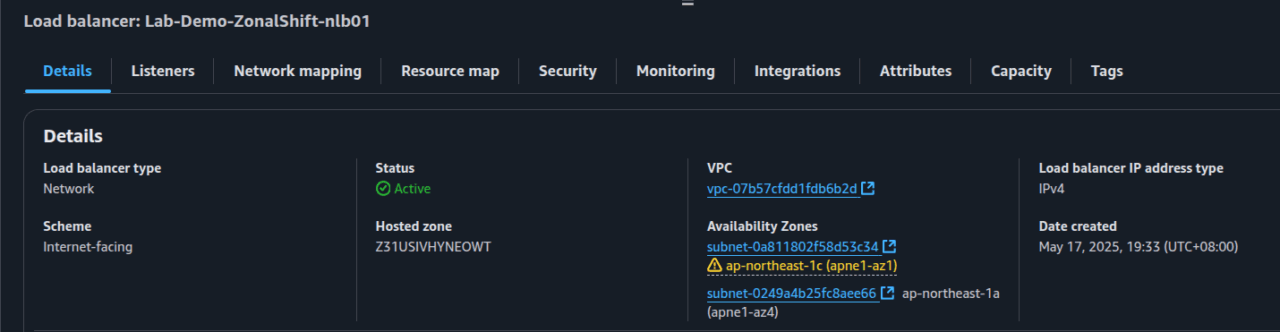
I’m happy with the results, and I want to end the zonal shift. I can do it by running the following command:
❯ aws arc-zonal-shift cancel-zonal-shift --zonal-shift-id 18cb6f0d-32c8-dfcc-f17e-9d7ac4318c02NLB works with route53. When the endpoint of an AZ is unhealthy, the endpoint’s DNS record will be removed. When zonal shift is cancelled, the DNS record will be added back. In my environment, I have a caching resolver with a minimum TTL of 300s, I need to wait for 5 minutes before requests are being sent to all endpoints. I want to point out that NLB works closely with DNS. Wait for DNS update and propagation and do not expect things to work immediately. When I repeat the curl test after DNS records are refreshed, I see http requests being load balanced again:
❯ for i in seq 1 10; do curl -s http://Lab-Demo-ZonalShift-nlb01-91c9850eac4303f2.elb.ap-northeast-1.amazonaws.com; done | sort | uniq -c
6 placement: ap-northeast-1a
4 placement: ap-northeast-1c
Wrapping up
Zonal shift simplifies resilience tests. But note that it needs to be explicitly enabled on each NLB, and your NLB must meet these requirements. If you find your environment not compatible with zonal shift, you can still simulate an AZ failure by associating subnets with a block-all NACL.
Thank you for reading. Hope you find useful information on this post.
